Monday, June 17, 2019
Wednesday, February 1, 2017
Resetting a Nessus Home Edition Password in Kali Linux
Open a terminal, and type the command “cd /opt/nessus/sbin” to navigate to the sbin directory.Open a terminal, and type the command “cd /opt/nessus/sbin” to navigate to the sbin directory.
ext type command “./nessuscli lsuser ” to see all the nessus users present. Here, we have only one. Ok, let’s reset the password for user root. Type command ” ./nessuscli chpasswd (username) “. The system will prompt you to enter the new password. Enter the password two times as shown below. You have successfully changed the nessus password. Now logon with the new password.
Thursday, September 29, 2016
Thursday, September 15, 2016
OSWAP Directory Buster
A good hacker will not directly attack a website without proper information gathering. It is a good practice of understanding the structure of a website by busting the directories and files.
This may give you an opportunity to find some hidden and confidential dictories and files that are considered to be inaccessible by the public. This may lead you to gain important information like password, encryption keys, certificate files etc.
Before getting into it, I ll show you some additional details
This may give you an opportunity to find some hidden and confidential dictories and files that are considered to be inaccessible by the public. This may lead you to gain important information like password, encryption keys, certificate files etc.
Before getting into it, I ll show you some additional details
- Code 100 -> Continue : codes in this range denotes that the user / client request has not been completed for some reasons but the client can continue.
- Code 200 -> Successful : Codes in this range denotes that the request was successful.
- Code 300 -> Multiple Choice : Codes in this range denotes bad request . The most common codes are 404 [not found ] and 403 [forbidden].
Busting Time
Goto Applications -> kali LInux -> Web Application -> Web Crawlers -> dirbuster
Now, open DirBuster and enter the target website. Don't forget to mention http | https and port number 80 | 443 . eg: http://www.examplewebsite.com:80
Wordist:
Next, all you have to do is to choose the wordlist which contains the directories and files names. Here I've chose /usr/share/dirbuster/wordlists/directory-list-2.3-medium.txt
Finally, when we click the "start" DirBuster will generate GET requests and send them to the target website with a request for watch of the files and directories listed in our wordlist.
Once everything finished all the directories and files will be busted to you.
Wordist:
Next, all you have to do is to choose the wordlist which contains the directories and files names. Here I've chose /usr/share/dirbuster/wordlists/directory-list-2.3-medium.txt
Finally, when we click the "start" DirBuster will generate GET requests and send them to the target website with a request for watch of the files and directories listed in our wordlist.
Once everything finished all the directories and files will be busted to you.
Saturday, August 20, 2016
Top 10 Activities in Internet that makes you sit in Jail.
1.OPEN WIFI
Are you having a open wifi access at your home? Be ready to answer cops about the purpose.
* It is considered to be an offence to have an open wifi access point because there are chances to sniff the packets of the users who are using your account.
* Also, anyone can use your network with criminal intentions,that you may be answerable.
Better use WPA/2 with strong passwords to avoid getting caught.
2. Deleting your Search History
Although it is usual for us to delete the search history in our browser but there is a problem of doing it. If you happen to get caught for some hacking allegations cops will check your browser history, if it is not there..Then you have to sit behind bars. Even Indian Government insisting people to have their search history for the past three months..
3. Posting Offensive and abusive contents in social Media.
This is simply a wrong doing of posting offensive and abusive contents in social media, may be they wont consider this if you do this against some common people, but if you do against a actor or actress then you have to face many consequences. So dont post gossips online.
4. Online Gambling
This is quite banned in some of the countries but not in many countries because of the implementation in the deep web. So better check for the policies before playing gambling online.
5. Dancing videos in Online
You'll be arrested if the cops find you dancing in a video.. though it is not illegal but it is banned in some mid east countries.
6. Commenting on Facebook and twitter.
Check before posting your comments in your facebook or twitter.. abusive comments are considered to be an offence. Also confirm that no one is using your Facebook or twitter instead of you.. you have to face the consequences.
7. Sharing Files in Internet
Do not share files that consist of malicious contents. If the owner of the website found that you are sharing a malicious file through his website..You have to sit behind bars..you may ask how can they find it, the answer is often website owners has malicious file checking system in their server.
8. Using Sniffers in Public Network.
It often happens for hackers to use public networks for sniffing passwords and raw data. It is an offence if you get caught for using sniffers in public network.
9. Accessing others account.
This is also consider as a part of cracking which is exactly illegal. Don't open others account even if you have their passwords and details.
10. Plagiarism
If want to add someones content in your website, you have to ask them their permission. Most of the content posting websites will have a content tracking system that was monitored by 3rd party website. If you post you'll get caught for plagiarism.
There are many activities which can put you behind bars but this is the top most.
Friday, July 3, 2015
War Driving
Wireless
networking is the most popular and fast growing technology, from home
networking to the enterprise networking, wireless network now become a
way of life and way of networking. As more wireless network are
deployed, the need to secure them increase. But this is totally illegal and its only for educational purposes.
Here we are going to discuss about mapping a wireless network and exploit it.
War Driving
also known as access point mapping, is a act for searching, locating
and possibly exploit the Wireless LAN while driving on a vehicle.
Requirement
The requirement for effective wardriving is based on both hardware and software.
Hardware:
- Portable Computer (Laptop and Netbook etc.) or PDA (Personal digital assistance)
- A Wireless NIC card
- An Antenna
- A handheld GPS unit (Optional)
- GPS data Cable (Optional)
- A pigtail to connect NIC to external antenna software:
- A software program for wardriving is freely available on Internet.
- NetStumbler or inSSIDer for Windows
- Kismet for Linux, FreeBSD, NetBSD, OpenBSD, DragonFly BSD
This
is not enough there is need to discuss on how to choose wireless NIC
and antenna for wardriving. The IEEE 802.11 is a family of standards,
each one defining and specifying parts of the standard.
- 802.11b, using the 2.4 GHz radio spectrum and 11 Mbps max data rate.
- 802.11a, using the 5 GHz radio spectrum and 54 Mbps max data rate.
- 802.11g, using the 2.4 GHz radio spectrum and 54 Mbps max data rate.
802.11b cards are the most easiest to install and it supported by most wardriving tools (software's).
Even we can use some android tools to do this job, Eg. WIFI Collector which can grab the following details:
- Time
- Latitude
- Longitude
- Vendor's Name
- Wifi Name
- Wifi Security : wep / wpa / wpa2 / open
- WPS True | False
- Signal Strength
Web Application Security Testing
security is vitally important in software applications. More and more
people are using the Internet and computers to perform everyday tasks.
Software is everywhere, in your cell phone, car, airplanes, televisions,
and don't forget - your home computers. More and more of these
appliances are being connected to the Internet. Everyday services,
including banking, stock trading and taxes are all moving to an online
approach. Today's software is being produced faster than ever. The
majority of people using these software applications are unaware about
security. With shrinking budgets, tight schedules, and without the
knowledge of security testing, software vulnerabilities are everywhere.
Software applications are being used by people all over the world. Hence
application security testing and especially web application security
testing is a must for software products to succeed in today's world.
Security testing, which aims to eliminate the aspects of systems that do not relate to application functionality but to the confidentiality, integrity, and availability of applications, is commonly referred as "nonfunctional requirements (NFR) testing." NFR testing, which is used to determine the quality, security, and resiliency aspects of software, is based on the belief that nonfunctional requirements represent not what software is meant to do, but how the software might do it.
Security testing, when done properly, goes deeper and even beyond the functional testing/black-box probing on the presentation layer. By identifying risks in the system and creating tests driven by those risks, a software security tester can properly focus on areas of code in which an attack is likely to succeed. Software security is about making software behave in the presence of a malicious attack, even though in the real world, software failures usually happen spontaneously — that is, without intentional mischief.
The OWASP (Open Web Application Security Project) Top Ten is a list of the 10 most dangerous current Web application security flaws, which are listed below.
One of the most prevalent security-related issues to deal with is Input Validation. A functional quality assurance engineer can typically devise a variety of methods to verify the functionality of a feature or component. But a security tester needs to go deeper — he has to think like a malicious user, consider the cases that shouldn't be allowed, input things typical users would not attempt, and try to twist and break that application in any way possible. There are also many open source and licensed automation tools (Acuntix, Zed Attack proxy, Websecurify, etc.) available on the market which perform the dynamic analysis and penetration testing of web application to discover vulnerabilities such as:
Security testing, which aims to eliminate the aspects of systems that do not relate to application functionality but to the confidentiality, integrity, and availability of applications, is commonly referred as "nonfunctional requirements (NFR) testing." NFR testing, which is used to determine the quality, security, and resiliency aspects of software, is based on the belief that nonfunctional requirements represent not what software is meant to do, but how the software might do it.
Security testing, when done properly, goes deeper and even beyond the functional testing/black-box probing on the presentation layer. By identifying risks in the system and creating tests driven by those risks, a software security tester can properly focus on areas of code in which an attack is likely to succeed. Software security is about making software behave in the presence of a malicious attack, even though in the real world, software failures usually happen spontaneously — that is, without intentional mischief.
The OWASP (Open Web Application Security Project) Top Ten is a list of the 10 most dangerous current Web application security flaws, which are listed below.
- Injection
- Cross-Site Scripting
- Broken Authentication and Session Management
- Insecure Direct Object References
- Cross-Site Request Forgery (CSRF)
- Security Misconfiguration
- Failure to Restrict URL Access
- Invalidated Redirects and Forwards
- Insecure Cryptographic Storage
- Insufficient Transport Layer Protection
One of the most prevalent security-related issues to deal with is Input Validation. A functional quality assurance engineer can typically devise a variety of methods to verify the functionality of a feature or component. But a security tester needs to go deeper — he has to think like a malicious user, consider the cases that shouldn't be allowed, input things typical users would not attempt, and try to twist and break that application in any way possible. There are also many open source and licensed automation tools (Acuntix, Zed Attack proxy, Websecurify, etc.) available on the market which perform the dynamic analysis and penetration testing of web application to discover vulnerabilities such as:
- Client Certificate
- Proxy-Chaining
- Local and Remote File Include
- Cross-Site Scripting
- SQL injection
- Information Disclosure Problems
- Session Security Problems, etc.
Dos- SMURF
Smurf Attacks
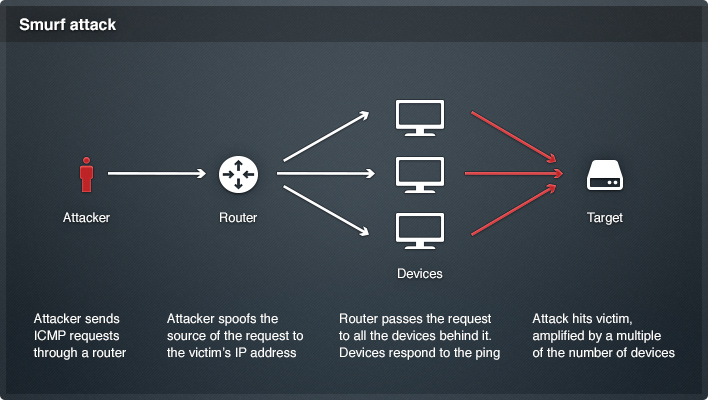
Smurf attacks are popular Denial of Service (DoS) network attacks, likely named because of its use of a large number of small ICMP packets.
The goal of this network attack is to create a crushing amount of
traffic. This attack strategy came about as a function of ICMP (Internet
Control Message Protocol) and the network broadcast address.
If an attacker has a large network segment that he is aware of, he
can send a ping or an ICMP Echo Request to that broadcast address. Each
host on that network should take that because the broadcast address was
used, though the Echo Request is actually destined for itself.
An Internet Control Message Protocol (ICMP) Smurf attack is a
brute-force attack on the direct broadcast feature that is built in to
the IP protocol.
Today i am going to Show you, How to do it on the network.
Requirement :- Backtrack5R3 installed on the VirtualBox
Click on Application > BackTrack > Stress Testing > network Stress testing
then select the Smurf6
Find your interface information with ifconfig command.
then enter the command like root@bt:~#smurf6 etho VictimIP-address
![]() |
then select the Smurf6
![]() |
Find your interface information with ifconfig command.
![]() |
then enter the command like root@bt:~#smurf6 etho VictimIP-address
![]() |
Countermeasures :-
1. On Cisco Router use the router(config)#autosecure command.
2. On the Cisco Router, use the router(config)#no ip-directed broadcast command.
Denial Of Service
DOS - Introduction
•A Denial of Service Attack (DoS Attack) is an attempt to make a computer resource
unavailable to its intended users. Although the means to carry out,
motives for, and targets of a DoS attack may vary, it generally consists
of the concerted efforts of a person or people to prevent an Internet
site or service from functioning efficiently or at all, temporarily or
indefinitely. Perpetrators of DoS attacks typically target sites or
services hosted on high profile
web servers such as banks, credit card payment gateways, and even root
nameservers. The term is generally used with regards to computer
networks, but is not limited to this field, for example, it is also used
in reference to CPU resource management. There are two general forms of
DoS attacks: those that crash services and those that flood services.
Symptoms
•Unusually slow network performance (opening files or accessing web sites)
•Unavailability of a Particular web site
•Inability to access any web site
•Dramatic increase in the number of spam emails received
Goal of the Attack
Primary Goals include:
•Consumption of computational resources, such as bandwidth, disk space, or processor time
•Disruption of configuration information, such as routing information.
•Disruption of state information, such as unsolicited resetting of TCP sessions.
•Disruption of physical network components.
•Obstructing the communication media between the intended users and the victim so that they can no longer communicate adequately.
ICMP Flood
•A
Smurf attack is one particular variant of a flooding DoS attack on the
public Internet. It relies on misconfigured network devices that allow
packets to be sent to all computer hosts on a particular network via the
broadcast address of the network, rather than a specific machine. The
network then serves as a smurf amplifier. In such an attack, the
perpetrators will send large numbers of IP packets with the source
address faked to appear to be the address of the victim. The network's
bandwidth is quickly used up, preventing legitimate packets from getting
through to their destination. To combat Denial of Service attacks on
the Internet, services like the Smurf Amplifier Registry have given
network service providers the ability to identify misconfigured networks
and to take appropriate action such as filtering.
•Ping flood is based on sending the victim an overwhelming number of ping packets, usually using the "ping" command from unix-like hosts (the -t
flag on Windows systems has a far less malignant function). It is very
simple to launch, the primary requirement being access to greater
bandwidth than the victim.
ICMP Flood
•SYN
flood sends a flood of TCP/SYN packets, often with a forged sender
address. Each of these packets is handled like a connection request,
causing the server to spawn a half-open connection, by sending back a TCP/SYN-ACK
packet, and waiting for a packet in response from the sender address.
However, because the sender address is forged, the response never comes.
These half-open connections
saturate the number of available connections the server is able to make,
keeping it from responding to legitimate requests until after the
attack ends.
Teardrop attacks
•A
Teardrop attack involves sending mangled IP fragments with overlapping,
over- sized payloads to the target machine. This can crash various
operating systems due to a bug in their TCP/IP fragmentation re-assembly
code. Windows 3.1x, Windows 95 and Windows NT operating systems, as
well as versions of Linux prior to versions 2.0.32 and 2.1.63 are
vulnerable to this attack.
•Around
September 2009, a vulnerability in Vista was referred to as a "teardrop
attack", but the attack targeted SMB2 which is a higher layer than the
TCP packets that teardrop used.
Peer-to-peer Attacks
•Attackers have found a way to exploit a number of bugs in peer-to-peer servers to initiate DDoS attacks. The most aggressive of these peer-to-peer-DDoS attacks exploits DC++. Peer-to-peer attacks are different from regular botnet-based attacks. With peer-to-peer
there is no botnet and the attacker does not have to communicate with
the clients it subverts. Instead, the attacker acts as a 'puppet
master,' instructing clients of large peer-to-peer file sharing hubs to disconnect from their peer-to-peer
network and to connect to the victim's website instead. As a result,
several thousand computers may aggressively try to connect to a target
website. While a typical web server can handle a few hundred
connections/sec before performance begins to degrade, most web servers
fail almost instantly under five or six thousand connections/sec. With a
moderately big peer-to-peer
attack a site could potentially be hit with up to 750,000 connections in
a short order. The targeted web server will be plugged up by the
incoming connections.
Peer-to-peer Attacks
•While peer-to-peer
attacks are easy to identify with signatures, the large number of IP
addresses that need to be blocked (often over 250,000 during the course
of a big attack) means that this type of attack can overwhelm mitigation
defenses. Even if a mitigation device can keep blocking IP addresses,
there are other problems to consider. For instance, there is a brief
moment where the connection is opened on the server side before the
signature itself comes through. Only once the connection is opened to
the server can the identifying signature be sent and detected, and the
connection torn down. Even tearing down connections takes server
resources and can harm the server.
•This
method of attack can be prevented by specifying in the p2p protocol
which ports are allowed or not. If port 80 is not allowed, the
possibilities for attack on websites can be very limited.
Permanent DOS Attacks
•A permanent denial-of-service
(PDoS), also known loosely as phlashing, is an attack that damages a
system so badly that it requires replacement or reinstallation of
hardware. Unlike the distributed denial-of-service
attack, a PDoS attack exploits security flaws which allow remote
administration on the management interfaces of the victim's hardware,
such as routers, printers, or other networking hardware. The attacker
uses these vulnerabilities to replace a device's firmware with a
modified, corrupt, or defective firmware image—a
process which when done legitimately is known as flashing. This
therefore "bricks" the device, rendering it unusable for its original
purpose until it can be repaired or replaced.
Application level Floods
•On IRC, IRC floods are a common electronic warfare weapon.
•Various DoS-causing exploits such as buffer overflow can cause server-running software to get confused and fill the disk space or consume all available memory or CPU time.
•Other
kinds of DoS rely primarily on brute force, flooding the target with an
overwhelming flux of packets, oversaturating its connection bandwidth
or depleting the target's system resources. Bandwidth-saturating
floods rely on the attacker having higher bandwidth available than the
victim; a common way of achieving this today is via Distributed Denial
of Service, employing a botnet. Other floods may use specific packet
types or connection requests to saturate finite resources by, for
example, occupying the maximum number of open connections or filling the
victim's disk space with logs.
•A
"banana attack" is another particular type of DoS. It involves
redirecting outgoing messages from the client back onto the client,
preventing outside access, as well as flooding the client with the sent
packets.
Nuke
•A Nuke is an old denial-of-service
attack against computer networks consisting of fragmented or otherwise
invalid ICMP packets sent to the target, achieved by using a modified
ping utility to repeatedly send this corrupt data, thus slowing down the
affected computer until it comes to a complete stop.
•A
specific example of a nuke attack that gained some prominence is the
WinNuke, which exploited the vulnerability in the NetBIOS handler in
Windows 95. A string of out-of-band data was sent to TCP port 139 of the victim's machine, causing it to lock up and display a Blue Screen of Death (BSOD).
DDos
•A
distributed denial of service attack (DDoS) occurs when multiple
systems flood the bandwidth or resources of a targeted system, usually
one or more web servers. These systems are compromised by attackers
using a variety of methods.
•Malware can carry DDoS attack mechanisms; one of the better-known
examples of this was MyDoom. Its DoS mechanism was triggered on a
specific date and time. This type of DDoS involved hardcoding the target
IP address prior to release of the malware and no further interaction
was necessary to launch the attack.
•A
system may also be compromised with a trojan, allowing the attacker to
download a zombie agent (or the trojan may contain one). Attackers can
also break into systems using automated tools that exploit flaws in
programs that listen for connections from remote hosts. This scenario
primarily concerns systems acting as servers on the web.
DDos
•Stacheldraht
is a classic example of a DDoS tool. It utilizes a layered structure
where the attacker uses a client program to connect to handlers, which
are compromised systems that issue commands to the zombie agents, which
in turn facilitate the DDoS attack. Agents are compromised via the
handlers by the attacker, using automated routines to exploit
vulnerabilities in programs that accept remote connections running on
the targeted remote hosts. Each handler can control up to a thousand
agents.
•These
collections of systems compromisers are known as botnets. DDoS tools
like stacheldraht still use classic DoS attack methods centered on IP
spoofing and amplification like smurf attacks and fraggle attacks (these
are also known as bandwidth consumption attacks). SYN floods (also
known as resource starvation attacks) may also be used. Newer tools can
use DNS servers for DoS purposes. See next section.
DDos
•Simple
attacks such as SYN floods may appear with a wide range of source IP
addresses, giving the appearance of a well distributed DDoS. These flood
attacks do not require completion of the TCP three way handshake and
attempt to exhaust the destination SYN queue or the server bandwidth.
Because the source IP addresses can be trivially spoofed, an attack
could come from a limited set of sources, or may even originate from a
single host. Stack enhancements such as syn cookies may be effective
mitigation against SYN queue flooding, however complete bandwidth
exhaustion may require involvement
•Unlike
MyDoom's DDoS mechanism, botnets can be turned against any IP address.
Script kiddies use them to deny the availability of well known websites
to legitimate users. More sophisticated attackers use DDoS tools for the
purposes of extortion — even against their business rivals.
DDos
•It
is important to note the difference between a DDoS and DoS attack. If
an attacker mounts an attack from a single host it would be classified
as a DoS attack. In fact, any attack against availability would be
classed as a Denial of Service attack. On the other hand, if an attacker
uses a thousand systems to simultaneously launch smurf attacks against a
remote host, this would be classified as a DDoS attack.
•The major advantages to an attacker of using a distributed denial-of-service
attack are that multiple machines can generate more attack traffic than
one machine, multiple attack machines are harder to turn off than one
attack machine, and that the behavior of each attack machine can be
stealthier, making it harder to track down and shut down. These attacker
advantages cause challenges for defense mechanisms. For example, merely
purchasing more incoming bandwidth than the current volume of the
attack might not help, because the attacker might be able to simply add
more attack machines.
Reflected Attack
•A
distributed reflected denial of service attack (DRDoS) involves sending
forged requests of some type to a very large number of computers that
will reply to the requests. Using Internet protocol spoofing, the source
address is set to that of the targeted victim, which means all the
replies will go to (and flood) the target.
•ICMP
Echo Request attacks (Smurf Attack) can be considered one form of
reflected attack, as the flooding host(s) send Echo Requests to the
broadcast addresses of mis-configured
networks, thereby enticing many hosts to send Echo Reply packets to the
victim. Some early DDoS programs implemented a distributed form of this
attack.
•Many
services can be exploited to act as reflectors, some harder to block
than others. DNS amplification attacks involve a new mechanism that
increased the amplification effect, using a much larger list of DNS
servers than seen earlier.
Degradation-of-service Attacks
•"Pulsing" zombies are compromised computers that are directed to launch intermittent and short-lived floodings of victim websites with the intent of merely slowing it rather than crashing it. This type of attack, referred to as "degradation-of- service" rather than "denial-of-service",
can be more difficult to detect than regular zombie invasions and can
disrupt and hamper connection to websites for prolonged periods of time,
potentially causing more damage than concentrated floods. Exposure of degradation-of-service
attacks is complicated further by the matter of discerning whether the
attacks really are attacks or just healthy and likely desired increases
in website traffic.
Countermeasures
Firewalls
•Firewalls
have simple rules such as to allow or deny protocols, ports or IP
addresses. Some DoS attacks are too complex for today's firewalls, e.g.
if there is an attack on port 80 (web service), firewalls cannot prevent
that attack because they cannot distinguish good traffic from DoS
attack traffic. Additionally, firewalls are too deep in the network
hierarchy. Routers may be affected even before the firewall gets the
traffic. Nonetheless, firewalls can effectively prevent users from
launching simple flooding type attacks from machines behind the
firewall.
•Some
stateful firewalls like OpenBSD's pF, can act as a proxy for
connections, the handshake is validated (with the client) instead of
simply forwarding the packet to the destination. It is available for
other BSDs as well. In that context, it is called "synproxy".
Countermeasures
Switches
•Most switches have some rate-limiting and ACL capability. Some switches provide automatic and/or system-wide
rate limiting, traffic shaping, delayed binding (TCP splicing), deep
packet inspection and Bogon filtering (bogus IP filtering) to detect and
remediate denial of service attacks through automatic rate filtering
and WAN Link failover and balancing.
•These
schemes will work as long as the DoS attacks are something that can be
prevented by using them. For example SYN flood can be prevented using
delayed binding or TCP splicing. Similarly content based DoS can be
prevented using deep packet inspection. Attacks originating from dark
addresses or going to dark addresses can be prevented using Bogon
filtering. Automatic rate filtering can work as long as you have set rate-thresholds correctly and granularly. Wan-link failover will work as long as both links have DoS/DDoS prevention mechanism.
Countermeasures
Routers
•Similar to switches, routers have some rate-limiting
and ACL capability. They, too, are manually set. Most routers can be
easily overwhelmed under DoS attack. If you add rules to take flow
statistics out of the router during the DoS attacks, they further slow
down and complicate the matter. Cisco IOS has features that prevent
flooding, i.e. example settings.
Application front end Hardware
•Application
front end hardware is intelligent hardware placed on the network before
traffic reaches the servers. It can be used on networks in conjunction
with routers and switches. Application front end hardware analyzes data
packets as they enter the system, and then identifies them as priority,
regular, or dangerous. There are more than 25 bandwidth management
vendors. Hardware acceleration is key to bandwidth management. Look for
granularity of bandwidth management, hardware acceleration, and
automation while selecting an appliance.
Countermeasures
IPS based prevention
•Intrusion-prevention
systems (IPS) are effective if the attacks have signatures associated
with them. However, the trend among the attacks is to have legitimate
content but bad intent. Intrusion-prevention systems which work on content recognition cannot block behavior-based DoS attacks.
•An
ASIC based IPS can detect and block denial of service attacks because
they have the processing power and the granularity to analyze the
attacks and act like a circuit breaker in an automated way.
•A rate-based
IPS (RBIPS) must analyze traffic granularly and continuously monitor
the traffic pattern and determine if there is traffic anomaly. It must
let the legitimate traffic flow while blocking the DoS attack traffic.
Countermeasures
Prevention via proactive testing
•Test platforms such as Mu Dynamics' Service Analyzer are available to perform simulated denial-of-service attacks that can be used to evaluate defensive mechanisms such IPS, RBIPS, as well as the popular denial-of-service mitigation products from Arbor Networks. An example of proactive testing of denial-of-service throttling capabilities in a switch was performed in 2008: The Juniper EX 4200 switch with integrated denial-of-service throttling was tested by Network Test and the resulting review was published in Network World.
Blackholing/Sinkholing
•With blackholing, all the traffic to the attacked DNS or IP address is sent to a "black hole" (null interface, non-existent server, ...). To be more efficient and avoid affecting your network connectivity, it can be managed by the ISP.
Countermeasures
Clean Pipes
•All
traffic is passed through a "cleaning center" via a proxy, which
separates "bad" traffic (DDoS and also other common internet attacks)
and only sends good traffic beyond to the server. The provider needs
central connectivity to the Internet to manage this kind of service.
•Prolexic and Verisign are examples of providers of this service.
Packet Sniffing and Packet Injection
Packet Sniffing and Packet Injecting
Packet Sniffing with Wireshark
Open wireshark by navigating the application menu or by typing “wireshark” in the console.
Once WireShark is open, Click Interface List
(1). A second window will open with a list
of interfaces that can capture packets. Notice our monitor device
mon0 is there from when we set it earlier. Click on start
(2) and WireShark will begin to capture
packets and display them in the window. These are wireless packets which
your wireless card (in my case the Alfa One Adapter), are sniffing out
of the air.
Now lets sniff packets from our own access
point. To do this, we are going to use airodump-ng. Airodump-ng is used
to capture wireless packets which have WEP encryption with the idea that
you will use aircrack-ng (don’t worry, we’ll get to that soon). But for
this time around, lets turn off the encryption on our wireless access
point.
Now open up the terminal and type:
airodump-ng --bssid 5C:D9:98:6A:64:8A mon0
Note:
5C:D9:98:6A:64:8A is the MAC address of my wireless access point.
To find yours, go to your wireless router web interface and look for
status. There you should find the wireless mac address of your router.
After airodump-ng finishes, you will see your access point with the channel it is running on.
Now we have to lock on to our access point by setting our wireless card to the channel of our access point. To do this, type:
iwconfig mon0 channel 6(Where “6” is the channel of your access point.)
Now fire up wireshark, sniff for packet with your mon0 interface. Now type in the filter box:
(wlan.bssid == MAC ADDRESS HERE) && (wlan.fc.type_subtype == 0x20)
Now we will be sniffing only data packets from our access point.
Packet Injecting
First we want to see only non-beacon packets in wireshark. So open wireshark and type in your filter box:
bssid ==
5C:D9:98:6A:64:8A) && !(wlan.fc.type_subtype == 0x08).
Note: Replace
5C:D9:98:6A:64:8A with your own mac address.
Then open the terminal and type:
aireplay-ng -9 -e "wifi-name" -a 5C:D9:98:6A:64:8A mon0
Note: Replace wifi-name with the name of your SSID and
5C:D9:98:6A:64:8A with your own mac address.
If
you go back to wireshark, you should see some packets that were
injected. These are just random packets that do not have any real
effect.
Scanning with NMAP
- Start Zenmap
- Instructions:
- zenmap
- Perform a quick scan by doing the following:
- Replace 192.168.1.110 with Damn Vulnerable WXP-SP2's IP Address obtained from (Section 3, Step 6).
- Instructions:
- Target: 192.168.1.110
- Profile: Select Quick Scan
- Click the Scan Button.
- Output Analysis
-
- Nmap's quick scan displays the following basic network metrics:
- If the host is up.
- How many ports are closed.
- Which ports are open and their service name.
- e.g., 21 (ftp)
- Also, the MAC address is display with Nmap's guess of the OS being VMware.
- Nmap's quick scan displays the following basic network metrics:
-
| Zenmap Intense Scan |
- Perform Intense Scan
-
- Replace 192.168.1.110 with Damn Vulnerable WXP-SP2 IP Address obtained from (Section 3, Step 6).
- Instructions:
- Target: 192.168.1.110
- Profile: Select Intense Scan
- Click the Scan Button.
-
- Version Analysis
-
- Notice the results are more verbose.
- The actual version of the service was added to service name.
- You can use this information to investigate possible exploits.
- For Example, Microsofts ISS http 5.1 webserver.
-
| Section 7. Nmap Network Scan |
- Subnet Ping Scan
-
- Obtained the subnet mask of your Damn Vulnerable WXP-SP2 from (Section 3, Step 6).
- Instructions:
- Change Target to the subnet address of Damn Vulnerable WXP-SP2.
- In my case, 192.168.1.0/24
- Notice, that I replaced the last octet of my IP address with a 0.
- The /24 represents the subnet mask.
- Change Profile to: Ping Scan
- Click Scan
- Change Target to the subnet address of Damn Vulnerable WXP-SP2.
-
- Topology Analysis
- Instructions:
- Click on the Topology Tab.
- Click on Fisheye
- Click on Controls
- This will allow you to increase the size of the network rings.
- Click on the Zoom Arrow
- Note(FYI):
- This will give you a visual representation of how your network is laid out.
- When presenting a customer or management with a penetration testing analysis, this would be a good picture to throw into the report
- Instructions:
| Performing NMAP Scans |
- Perform Quick NMAP Scan
- Instructions(FYI):
- Replace 192.168.1.110 with Damn Vulnerable WXP-SP2 IP Address obtained from (Section 3, Step 6)
- Instructions:
- nmap -T4 -F 192.168.1.110 | tee /var/tmp/nmap.quick.txt
- nmap - is the NMAP scanner.
- | tee /var/tmp/nmap.quick.txt - View output and sent it to file nmap.quick.txt.
- nmap -T4 -F 192.168.1.110 | tee /var/tmp/nmap.quick.txt
- Instructions(FYI):
- Perform Intense NMAP Scan
- Instructions(FYI):
- Replace 192.168.1.110 with Damn Vulnerable WXP-SP2 IP Address obtained from (Section 3, Step 6)
- Instructions:
- nmap -p 1-65535 -T4 -A -v 192.168.1.110 | tee /var/tmp/nmap.intense.txt
- nmap - is the NMAP scanner.
- | tee /var/tmp/nmap.intense.txt - View output and sent it to file nmap.intense.txt.
- nmap -p 1-65535 -T4 -A -v 192.168.1.110 | tee /var/tmp/nmap.intense.txt
- Instructions(FYI):
| Proof of Lab |
- Proof of Lab
- Proof Of Lab Instructions:
- Do a PrtScn of the below commands
- Paste into a word document
- Upload to Moodle
- Instructions
- ls -l /var/tmp/nmap*
- date
- echo "Your Name"
- Put in your actual name in place of "Your Name"
- e.g., echo "John Gray"
- Proof Of Lab Instructions:
Subscribe to:
Posts (Atom)